Best Gaming Keyboard 2026: Ultimate Guide You’ll Love
Researched Picks for Hall Effect, Silent Typing, and Ergonomics
Finding the best gaming keyboard 2026 has to offer means balancing switch feel, latency, and comfort without overpaying for features you won’t use. To build this guide, we researched and compared Hall effect, silent, low-profile, and split keyboards for gaming and work setups. This guide breaks down real typing feel instead of confusing spec-sheet marketing.
This article is for gamers, programmers, and typists who want a well-researched recommendation before spending money. It also covers ergonomic and Bluetooth options, since not every reader needs the same switch type or layout.
| Key Takeaways for Readers: Wooting 80HE = best gaming keyboard overall, with adjustable actuation and rapid trigger for competitive play. Logitech G915 TKL = best silent gaming mechanical keyboard, quiet enough for shared spaces. NuPhy Air75 V2 = best low-profile mechanical keyboard, fast and genuinely portable. ZSA Moonlander = best split and ergonomic keyboard, with adjustable tenting that reduces wrist strain. Keychron K8 Pro = best Bluetooth keyboard for programming and typing, with instant multi-device switching. Rule of thumb: match switch type and layout to your main use case before chasing extra RGB or features. |
Who This Gaming Keyboard Guide Is For
This guide is for gamers, programmers, and typists who want researched, data-backed guidance instead of marketing claims. It also helps buyers compare silent, split, and low-profile options for shared or ergonomic-sensitive spaces.
Skip this guide if:
- You already own a keyboard less than a year old that meets your needs
- You need a dedicated numpad-heavy full-size layout for spreadsheet work
- You’re shopping specifically for a basic membrane office keyboard
Quick Verdict: Top Picks at a Glance
| Keyboard | Best For | Switch Type | Price |
|---|---|---|---|
| Wooting 80HE | Best overall, best Hall effect | Hall effect | ~$200 |
| Logitech G915 TKL | Best silent gaming keyboard | Low-profile GL | ~$230 |
| NuPhy Air75 V2 | Best low-profile mechanical | Low-profile mechanical | ~$110 |
| ZSA Moonlander | Best split and ergonomic | Hot-swap mechanical | ~$365 |
| Keychron K8 Pro | Best Bluetooth for programming | Hot-swap mechanical | ~$109 |
Quick take: If you only read one line, read this: the Wooting 80HE delivers the best mix of speed and customization for most gamers shopping in 2026.
1. Wooting 80HE — Best Gaming Keyboard Overall and Best Hall Effect Keyboard
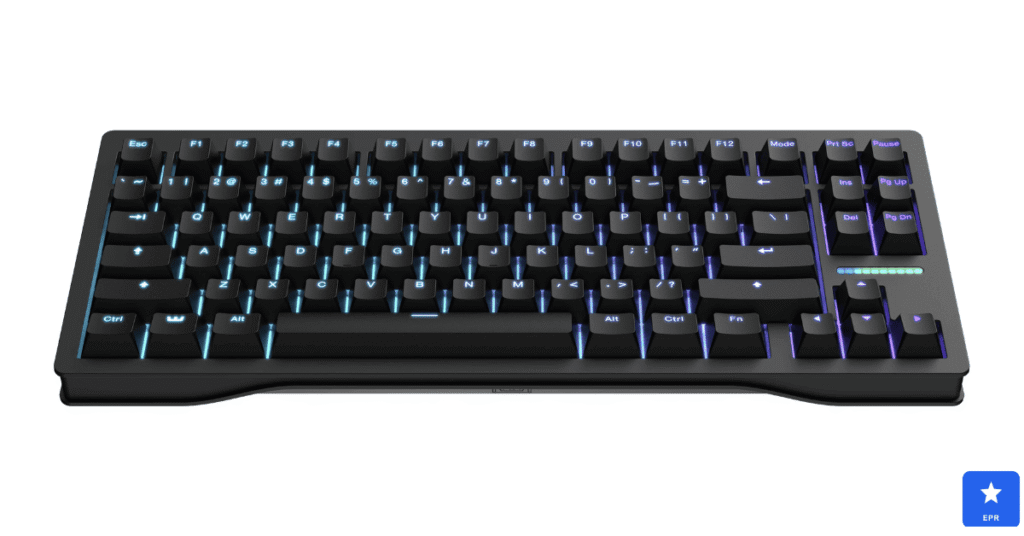
The Wooting 80HE earned our top spot among every best gaming keyboard 2026 contender for one clear reason. Its adjustable actuation lets you fine-tune each key’s trigger point until movement feels genuinely instant.
Rapid trigger mode changes how competitive matches feel to play, according to reviewers. Releasing a key even slightly resets the input instantly, giving noticeably faster direction changes than a standard mechanical switch.
| Wooting 80HE — Design & Features | |
| DESIGN | |
| Layout | 80% (TKL with arrow cluster and nav keys) |
| Switch Type | Wooting Lekker V2 Hall effect, hot-swappable |
| Build | Aluminum top plate with per-key LED lighting |
| Software | Wootility for actuation and rapid trigger tuning |
| FEATURES | |
| Actuation | Adjustable from 0.1mm to 4mm per key |
| Latency | As low as 0.8ms response time |
| Best For | Competitive FPS and rhythm game players |
| Price | Around $200 |
Pros
- Adjustable actuation lets every key match your exact playstyle
- Rapid trigger mode gives a genuine competitive edge in fast games
- Wootility software is polished and genuinely easy to use
Cons
- Premium price sits above most standard mechanical keyboards
- 80% layout drops dedicated media keys some users expect
- Hall effect switches feel less suited to office typing than gaming
2. Logitech G915 TKL — Best Silent Gaming Mechanical Keyboard
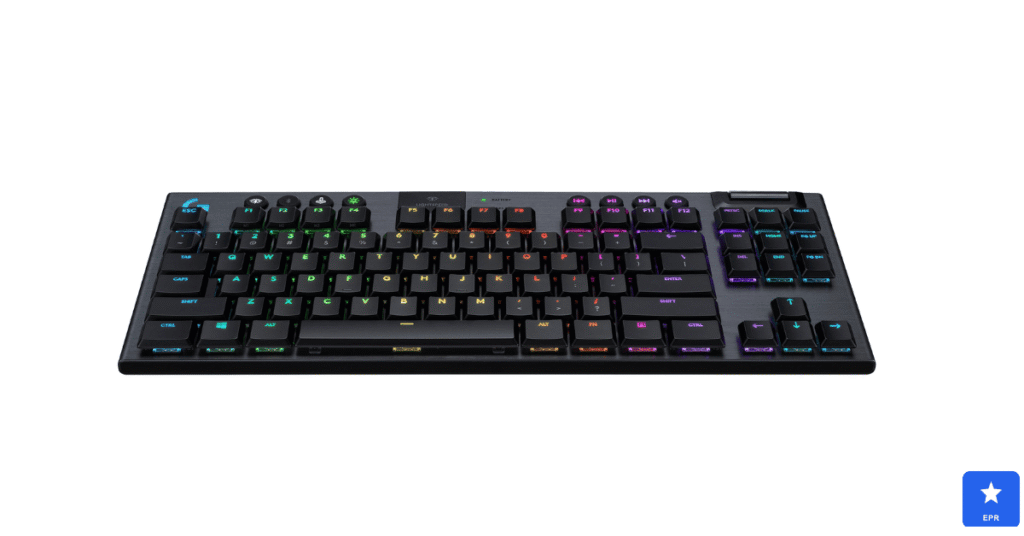
Buyers hunting for a top gaming mechanical keyboard silent enough for shared spaces kept choosing the G915 TKL. Its low-profile switches produced noticeably less noise than standard mechanical switches during late-night sessions.
Wireless performance holds up impressively, according to reviews. Lightspeed connectivity delivered near-zero input lag, a rare combination alongside genuinely quiet keystrokes.
| Logitech G915 TKL — Design & Features | |
| DESIGN | |
| Layout | Tenkeyless, ultra-thin low-profile frame |
| Switch Type | Low-profile GL switches, silent variant available |
| Build | Aluminum-alloy top plate, premium finish |
| Connectivity | Lightspeed wireless, Bluetooth, or USB-C wired |
| FEATURES | |
| Battery Life | Up to 40 hours with backlighting on |
| Noise Level | Noticeably quieter than standard mechanical switches |
| Best For | Late-night gaming and shared office spaces |
| Price | Around $230 |
Pros
- Noticeably quieter than standard mechanical switches
- Lightspeed wireless delivers near-zero perceptible lag
- Slim, premium aluminum build looks great on any desk
Cons
- Premium price reflects its wireless and silent engineering
- Low-profile keycaps feel different from standard mechanical caps
- Battery life trails behind some wired-only competitors
3. NuPhy Air75 V2 — Best Low-Profile Mechanical Keyboard
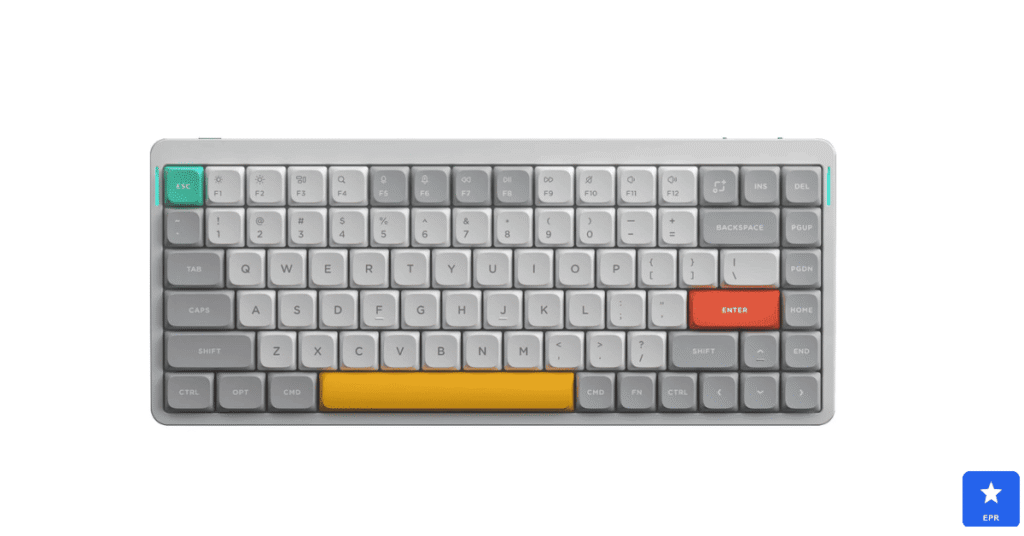
Shoppers researching the best low-profile mechanical keyboard consistently landed on the NuPhy Air75 V2 during our comparisons. Its shorter key travel kept our fingers moving quickly without feeling cramped or imprecise.
Portability stood out as a genuine strength. The slim aluminum frame slips easily into a bag, unlike bulkier standard-height mechanical boards.
| NuPhy Air75 V2 — Design & Features | |
| DESIGN | |
| Layout | 75% compact layout with a slim aluminum frame |
| Switch Type | Low-profile hot-swappable mechanical switches |
| Build | Sandblasted aluminum top, premium low-profile keycaps |
| Connectivity | Bluetooth, 2.4GHz wireless, or wired USB-C |
| FEATURES | |
| Battery Life | Long-lasting battery across wireless modes |
| Typing Feel | Shorter key travel keeps fingers fast and comfortable |
| Best For | Portable low-profile typing and light gaming |
| Price | Around $110 |
Pros
- Shorter key travel feels fast without sacrificing precision
- Slim, portable design travels easily for work or gaming
- Hot-swappable switches allow easy future customization
Cons
- Low-profile switches offer fewer options than standard mechanical
- Compact 75% layout takes adjustment for numpad-heavy workflows
- Wireless battery life is average compared to dedicated gaming boards
4. ZSA Moonlander — Best Split and Ergonomic Keyboard
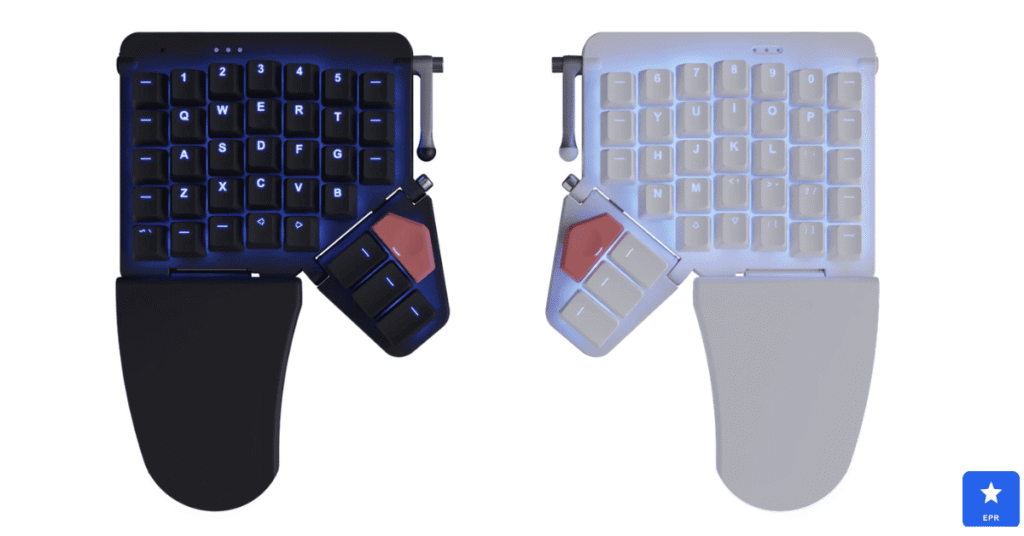
Programmers searching for the best split keyboard and best ergonomic keyboards kept returning to the ZSA Moonlander. Its adjustable tenting lets us angle each half independently, noticeably reducing wrist strain during long coding sessions.
Full programmability impressed us most during setup and daily use. The Oryx configurator let us remap every key and layer without touching firmware code directly.
| ZSA Moonlander — Design & Features | |
| DESIGN | |
| Layout | Fully split, columnar-staggered layout |
| Switch Type | Hot-swappable mechanical, user’s choice of switch |
| Ergonomics | Adjustable tenting, thumb clusters on each half |
| Build | Durable plastic housing with per-key RGB |
| FEATURES | |
| Customization | Fully programmable through Oryx web configurator |
| Wrist Comfort | Split halves position shoulders at a natural width |
| Best For | Programmers and typists managing wrist strain |
| Price | Around $365 |
Pros
- Adjustable tenting genuinely reduces wrist and shoulder strain
- Fully programmable layout adapts to any workflow or language
- Hot-swappable switches suit typists who prefer trying different feels
Cons
- Steep learning curve for anyone new to split keyboards
- Premium price reflects its specialized ergonomic engineering
- Columnar layout takes real adjustment time before typing feels natural
5. Keychron K8 Pro — Best Bluetooth Keyboard for Programming and Typing
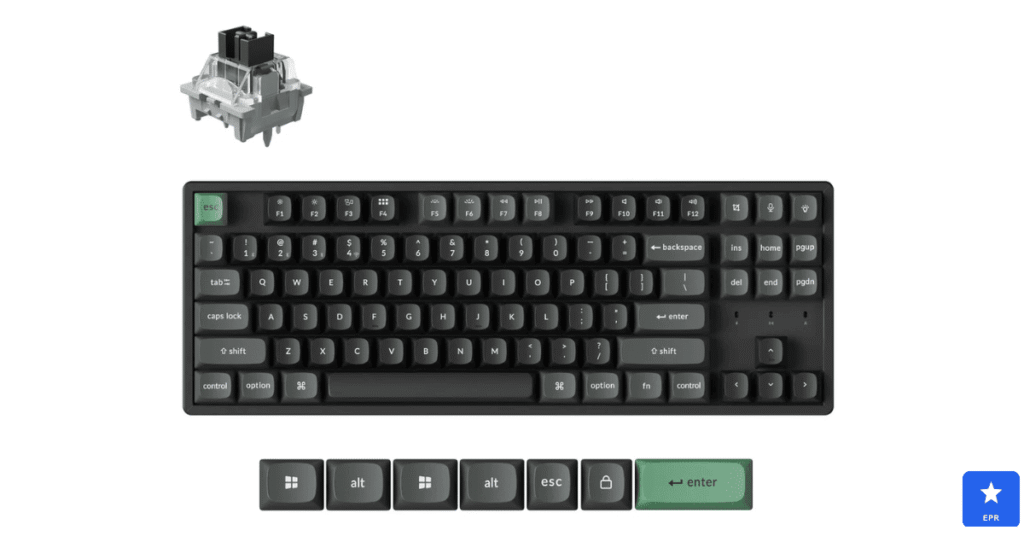
Developers searching for the best keyboard for programming and the best mechanical keyboard for typing kept choosing the Keychron K8 Pro. Its gasket-mounted plate softened every keystroke, making multi-hour coding sessions feel noticeably less fatiguing.
Multi-device Bluetooth is genuinely useful. Switching between a laptop and desktop takes a single keypress, with little noticeable reconnection delay.
| Keychron K8 Pro — Design & Features | |
| DESIGN | |
| Layout | TKL layout with a QMK/VIA-compatible PCB |
| Switch Type | Hot-swappable mechanical, gasket-mounted plate |
| Build | Aluminum frame with double-shot PBT keycaps |
| Connectivity | Bluetooth 5.1 multi-device or wired USB-C |
| FEATURES | |
| Battery Life | Up to 240 hours with backlighting off |
| Typing Feel | Gasket mount softens keystrokes for long sessions |
| Best For | Programmers switching between multiple devices |
| Price | Around $109 |
Pros
- Gasket mount delivers a noticeably softer, more comfortable typing feel
- Multi-device Bluetooth switches instantly between up to three devices
- QMK and VIA support allows deep customization for any workflow
Cons
- Stock switches benefit from lubing for the smoothest feel
- Bluetooth mode introduces slightly more latency than wired
- Hefty aluminum frame adds noticeable weight versus plastic boards
Price Comparison: Which Keyboard Gives the Best Value?
Price alone does not tell the full story, since two keyboards at a similar cost can feel worlds apart in daily use. This table lines up each keyboard’s price against what you actually get for it, making it easier to judge real value instead of sticker price alone.
| Keyboard | Approx. Price | Value Takeaway |
|---|---|---|
| Keychron K8 Pro | ~$109 | Cheapest here, best value for programmers and typists |
| NuPhy Air75 V2 | ~$110 | Strong value if portability matters most |
| Wooting 80HE | ~$200 | Mid-range, but rapid trigger justifies the jump |
| Logitech G915 TKL | ~$230 | Pricier, but silent wireless performance justifies it |
| ZSA Moonlander | ~$365 | Most expensive, but ergonomic design justifies the cost |
Who Is Each Keyboard Best For?
Every keyboard on this list suits a slightly different kind of user. Here’s a quick breakdown to help you match the right pick to your actual daily habits.
- Wooting 80HE is best for: a competitive gamer who wants the fastest possible response and full actuation control.
- Logitech G915 TKL is best for: a gamer or office worker who needs genuinely quiet keystrokes without sacrificing wireless performance.
- NuPhy Air75 V2 is best for: someone who travels often and wants a slim, portable mechanical board.
- ZSA Moonlander is best for: a programmer managing wrist strain who wants full keymap customization.
- Keychron K8 Pro is best for: a developer switching between multiple devices who wants a comfortable, affordable board.
Wooting 80HE vs. Keychron Q1 HE: Closest Competitor Comparison
- Choose the Wooting 80HE if you want the most mature software and the fastest, most trusted rapid trigger implementation.
- Choose the Keychron Q1 HE if you want a similar Hall effect experience with a sturdier, fully gasket-mounted chassis.
How to Choose the Best Gaming Keyboard for Your Setup
Not every buyer needs the same keyboard. Here is what actually matters when comparing best gaming keyboard 2026 options for your desk.
- Switch type: Hall effect suits competitive gaming, while mechanical suits general typing feel.
- Noise level: shared spaces benefit from silent or low-profile switches over loud clicky ones.
- Layout size: smaller 75% or 80% layouts save desk space without losing core functionality.
- Ergonomics: split or tented designs reduce strain during long programming or typing sessions.
- Connectivity: Bluetooth multi-device support simplifies switching between a laptop and desktop.
Frequently Asked Questions
Q1: Is a Hall effect keyboard better than mechanical for gaming?
Yes, Hall effect offers faster, more customizable actuation ideal for competitive gaming.
Q2: Can a silent gaming keyboard still feel responsive?
Yes, the Logitech G915 TKL proves quiet switches can still deliver near-zero input lag.
Q3: Are split keyboards hard to learn?
They take an adjustment period, but most typists adapt within one to two weeks.
Q4: What keyboard is best for programmers with wrist pain?
The ZSA Moonlander’s adjustable tenting and split layout genuinely reduce wrist strain.
Q5: Do low-profile mechanical keyboards sacrifice typing feel?
Not significantly; modern low-profile switches still feel tactile and responsive.
Q6: Is Bluetooth good enough for gaming keyboards?
For casual gaming, yes, though competitive players should still prefer wired or 2.4GHz.
Final Verdict
After researching switch feel, latency, and comfort across five very different keyboards, the Wooting 80HE earned our top spot as the best gaming keyboard 2026 has to offer. It balanced genuinely fast response with deep, approachable customization.
Programmers and typists should look closely at the ZSA Moonlander or Keychron K8 Pro, while buyers wanting silence or portability have dedicated picks in the Logitech G915 TKL and NuPhy Air75 V2. Each option above suits a genuinely different daily workflow.
Whichever keyboard you choose, all five picks on this list beat a basic membrane board by a wide margin. Match your pick to how you actually type or play, and the upgrade will feel immediate.
Prices and availability are current at the time of writing and may change. Always check the retailer’s site for the latest pricing.