How to Measure a TV: Avoid This Costly Mistake
Get the Exact Fit Before You Buy or Mount Anything
Buying a new television gets confusing fast once screen size, wall space, and stand width all enter the picture. Learning how to measure a TV correctly is the single step most buyers skip, and it’s the one that causes the most returns. This beginner’s guide walks through every measurement in plain, simple language.
This article is for anyone shopping for a new TV, mounting one on a wall, or double-checking that a stand will actually fit. It is not for AV professionals who already own a laser measure and know their viewing distance by heart.
| Key Takeaways for Readers: A TV’s advertised size is always the diagonal measurement, corner to corner, not the width. Screen width is roughly 87% of the diagonal size; height is roughly 49% of the diagonal size. A 65-inch TV measures about 57 inches wide and 33 inches tall without the stand. Always add a few extra inches on each side when measuring for a wall mount or TV stand. TCL and Vizio both sell budget-friendly TVs, but reliability and software quality differ between them. Rule of thumb: measure your space first, then shop for a screen size, not the other way around. |
Who This TV Measuring Guide Is For
This guide is for first-time TV buyers who want to avoid an expensive sizing mistake. It also helps anyone planning a wall mount who needs exact width and height numbers before drilling anything.
Skip this guide if:
- You already have your TV’s exact spec sheet with width and height listed
- You’re buying a TV to replace an identical size you already own
- You just need a rough estimate and don’t care about an exact fit
How to Measure a TV Screen: Step-by-Step
Learning how to measure a TV screen only takes a few minutes with a flexible tape measure. Follow these steps in order for an accurate, reliable result every single time.
Step 1: Find the true screen edge. Use a flashlight to spot exactly where the lit picture area starts, since some bezels overlap the glass slightly.
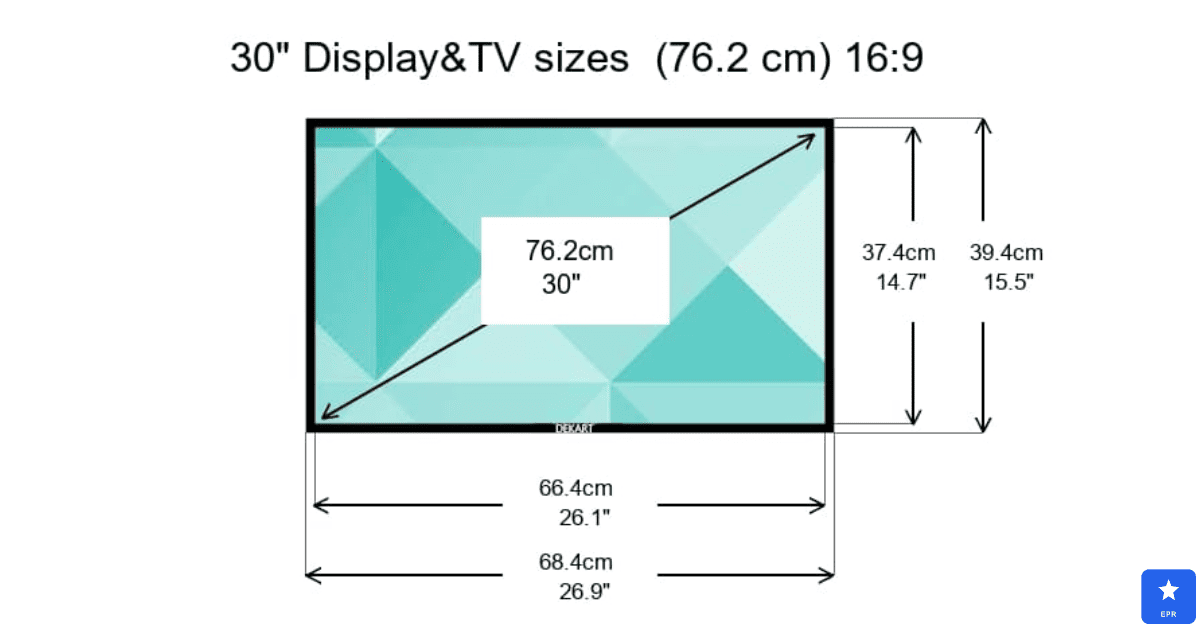
Step 2: Measure the diagonal. Stretch the tape from the top-left corner of the picture to the bottom-right corner, or vice versa.
Step 3: Skip the bezel for screen size. The advertised diagonal size only counts the viewable picture, not the frame around it.
Step 4: Double-check with the opposite corners. Measure from top-right to bottom-left as well; both diagonals should match within a few millimeters.
How Do You Measure a TV’s Width, Height, and Depth?
Once you know how to measure a television size diagonally, width and height come next for mounting or shelving. Place the tape horizontally across the middle of the screen for width, then vertically along one edge for height.
Depth matters most for cabinets and enclosed stands with limited clearance. Measure from the front of the screen to the very back of the panel, including any bulge from ports or a swivel stand.
TV Size Chart: Diagonal, Width, and Height
This reference chart converts the diagonal screen size into approximate width and height for the most popular TV sizes sold today.
| Screen Size (Diagonal) | Approx. Width | Approx. Height |
|---|---|---|
| 32 inches | 28 inches | 16 inches |
| 43 inches | 37.5 inches | 21 inches |
| 50 inches | 43.5 inches | 24.5 inches |
| 55 inches | 48 inches | 27 inches |
| 65 inches | 57 inches | 33 inches |
| 75 inches | 65 inches | 37 inches |
| 85 inches | 74 inches | 42 inches |
How Wide Is a 65-Inch TV?
This exact question comes up more than almost any other TV sizing search. A 65-inch TV measures roughly 57 inches wide and 33 inches tall, not counting the stand feet or any external speaker bar.
For wall mounting, leave extra clearance on both sides of that 57-inch width. We recommend at least 4 to 6 inches of breathing room per side for ventilation and easier cable access behind the panel.
Common TV Measuring Mistakes
Get It Right
- Always measure the diagonal from the visible picture, not the outer frame
- Add extra width when shopping for a TV stand, not just the screen size
- Measure your actual wall space before falling in love with a bigger screen
Avoid These Errors
- Measuring the box dimensions instead of the actual screen
- Forgetting to include the stand’s feet width, which is often wider than the screen
- Ignoring depth when the TV needs to fit inside an enclosed cabinet
Is TCL a Good TV? A Quick Brand Spotlight
TCL earns strong marks for value, often delivering brightness and dimming zones that rival pricier brands at a noticeably lower price point. Reliability improves significantly on the 5-Series and higher tiers.
Pros
- Excellent picture quality per dollar spent, especially on Mini-LED models
- Frequent discounts make premium features more affordable
- Reliable performance on mid-range and higher-tier models
Cons
- Entry-level models show more inconsistent build quality
- Software can feel sluggish compared to premium competitors
- Resale value trails behind established brands like Samsung
Is Vizio a Good TV? A Quick Brand Spotlight
Vizio built its reputation on affordable pricing, but recent reviews show a noticeable dip in picture quality and software polish. Since being acquired by Walmart, new model releases have also slowed down considerably.
Pros
- Still among the cheapest large-screen options on the market
- Wide availability at Walmart stores and online
- Higher-tier Quantum models perform better than budget lines
Cons
- Recent independent reviews rated most models below average overall
- Smart TV software reports frequent bugs and slow response times
- Fewer new model releases compared to competitors like TCL
TCL vs Vizio: Closest Competitor Comparison
- Choose TCL if you want stronger picture quality and more consistent reliability at a similar budget price point.
- Choose Vizio only if price is your absolute top priority and you’re comfortable with some software quirks.
How to Choose the Right TV Size for Your Room
Room size and viewing distance matter just as much as the measurements themselves.
- Viewing distance: multiply your screen size by 1.2 to estimate a comfortable seating distance in inches.
- Room width: leave enough space on either side of the TV for stand feet or mount brackets.
- Furniture fit: measure your TV stand’s width before assuming a larger screen will fit.
- Wall structure: locate wall studs before mounting anything heavier than a lightweight panel.
- Ventilation space: leave a few inches of clearance around enclosed cabinet installations.
Frequently Asked Questions
Q1: How do I measure a TV screen without a tape measure?
Use a piece of string along the diagonal, then measure the string length with a ruler afterward.
Q2: Does TV size include the stand or bezel?
No, the advertised size only counts the diagonal of the visible picture area.
Q3: How wide is a 55-inch TV compared to a 65-inch TV?
A 55-inch TV is about 48 inches wide, roughly 9 inches narrower than a 65-inch model.
Q4: Is TCL a good TV brand for the price?
Yes, TCL offers strong picture quality per dollar, especially on 5-Series models and higher.
Q5: Is Vizio a good TV brand right now?
It’s budget-friendly, but recent models score below average compared to TCL and Hisense.
Q6: What’s the ideal viewing distance for a 65-inch TV?
Aim for roughly 78 inches, or about 6.5 feet, using the screen-size-times-1.2 formula.
Final Verdict
Knowing how to measure a TV properly saves you from the single most common and avoidable buying mistake: a screen that doesn’t fit your space. Always measure the diagonal for screen size, then check width, height, and depth separately for mounting or shelving.
If you’re torn between budget brands, TCL currently offers more consistent quality than Vizio at a similar price. Measure twice, check your stand or wall space, and you’ll get the fit right on the first try.
Measurements are approximate and can vary slightly by model and manufacturer. Always confirm exact dimensions on the product spec sheet before buying.


One Comment