UHD vs QLED
The Honest Answer Most Sites Won’t Tell You
Shopping for a new TV means facing a wall of confusing labels, and UHD vs QLED is one of the most common questions buyers type into Google. After researching and comparing multiple 4K screens, it becomes clear that most shoppers are actually comparing two things that were never meant to compete. This guide clears up the confusion in plain language.
This article is for everyday buyers who want a straight answer before spending money on a new television. It is not for AV enthusiasts chasing lab-grade calibration numbers, since that level of detail needs a dedicated review site instead.
Quick Answer: QLED is the better pick if you watch in a bright room or want richer HDR color, even though it costs more. Standard UHD is enough if you mostly watch in dim light and want to save money, since the resolution itself is identical either way.
Quick Verdict: UHD vs QLED at a Glance
| Factor | UHD | QLED |
|---|---|---|
| What It Describes | Screen resolution (4K) | Display/backlight technology |
| Pixel Count | 3840 x 2160 | Varies, usually also UHD |
| Color & Brightness | Depends on panel used | Enhanced via quantum dot layer |
| Typical Price | More affordable overall | Higher due to added technology |
| Best Use Case | Budget 4K viewing | Bright rooms, sports, HDR |
| Key Takeaways for Readers: UHD is a resolution standard (3840×2160), not a display technology; it describes pixel count only. QLED is a display technology that uses a quantum dot layer to boost brightness and color. Most QLED TVs are already UHD, so this isn’t really an either-or choice for most buyers. The real decision is panel type: VA, IPS, Mini-LED, or OLED, not the UHD vs QLED label. QLED wins for bright rooms and sports; OLED and QD-OLED win for movie-night contrast. Rule of thumb: check panel type and peak brightness before comparing marketing terms. |
Who This TV Buying Guide Is For
This guide is for shoppers confused by TV spec sheets that mix resolution and display technology into the same sentence. It is built for buyers who want a plain-language answer before comparing prices.
Skip this guide if:
- You already know your panel type and just need current pricing
- You need a professional color-grading monitor for studio work
- You bought a TV in the last year, and it still meets your needs
What Is UHD?
UHD stands for Ultra High Definition, and it refers purely to screen resolution. A UHD screen packs 3840 by 2160 pixels into the display, giving four times the detail of Full HD. This resolution standard applies across LED, QLED, and OLED screens alike.
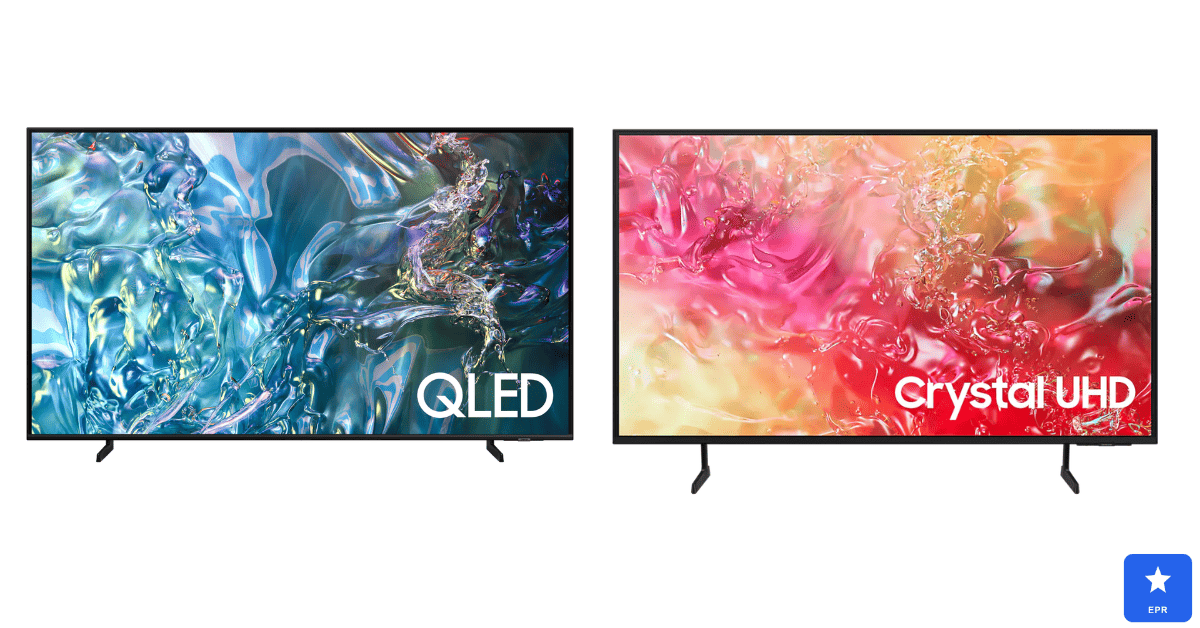
Crystal UHD, a term Samsung uses for its entry-level 4K sets, skips the quantum dot layer entirely. It still delivers sharp, detailed images, but colors and brightness stay closer to standard LED performance. This makes Crystal UHD vs QLED mostly a question of budget versus color punch.
| UHD / Crystal UHD — Key Specs | |
| Resolution | 3840 x 2160 pixels (4K) |
| Panel Types Used | Typically VA or IPS LCD panels |
| Color Technology | Standard LED, no quantum dot layer |
| Energy Use | More energy-efficient than QLED |
| Typical Price | Budget-friendly, widely available |
What Is QLED?
QLED stands for Quantum Dot Light Emitting Diode, a display technology pioneered by Samsung. A quantum dot layer sits in front of the LED backlight, converting light into more precise, vivid colors than standard LED screens can produce.
Nearly every QLED TV sold today is also a UHD television, combining sharp resolution with richer color output. Buyers should note that QLED TVs generally cost more than standard UHD sets because of this added quantum dot technology.
| QLED — Key Specs | |
| Resolution | Usually 4K UHD or higher |
| Panel Types Used | Mostly VA, some IPS variants |
| Color Technology | Quantum dot layer over LED backlight |
| Brightness | Often exceeds 1,500 to 2,000 nits |
| Typical Price | Higher than standard UHD sets |
UHD vs QLED: Head-to-Head Comparison
Comparing QLED vs. UHD directly only makes sense once you realize resolution and color technology are separate specs. A screen can be UHD resolution without QLED color, or QLED color without reaching UHD resolution, though the second case is now rare.
Picture Quality and Sharpness
Sharpness depends almost entirely on resolution, so UHD and QLED screens look equally crisp at the same pixel count. The real visual difference shows up in color depth and contrast, not in fine detail or text clarity.
Brightness and HDR Performance
QLED clearly wins here, often reaching 1,500 to 2,000 nits of peak brightness compared to standard UHD LED screens. This makes QLED the stronger choice for sunlit rooms or daytime sports watching.
Viewing Angles
Most QLED TVs use VA panels, which deliver deep contrast but lose color accuracy from the side. Standard UHD sets built on IPS panels usually hold their color better at wider viewing angles.
Price and Value
Standard UHD televisions remain the more budget-friendly option for casual viewers. QLED adds real value for color-sensitive content, but that upgrade comes with a noticeably higher price tag.
UHD Pros and Cons
Pros
- Budget-friendly pricing across nearly every screen size
- Same sharp 4K resolution as pricier QLED alternatives
- Lower energy consumption compared to quantum dot models
Cons
- Colors and brightness feel flatter without a quantum dot layer
- VA-based UHD models can struggle in brightly lit rooms
- Fewer premium features like local dimming zones
QLED Pros and Cons
Pros
- Significantly brighter picture, ideal for sunlit living rooms
- Wider, more vivid color gamut than standard UHD screens
- Strong HDR performance for movies and sports content
Cons
- Noticeably higher price than standard UHD televisions
- VA panels used in most models narrow the viewing angle
- Uses more power than a comparable standard UHD screen
Related Comparisons Worth Knowing
A few related display terms show up constantly alongside UHD vs QLED searches. Here is the short version of each so you can shop with confidence.
- QNED vs QLED: QNED is LG’s mini-LED answer to QLED, adding a NanoCell layer for better black levels and contrast.
- QD-OLED vs OLED: QD-OLED swaps OLED’s color filters for a quantum dot layer, boosting brightness while keeping OLED’s perfect blacks.
- IPS vs OLED: IPS panels get brighter and avoid burn-in, while OLED delivers true blacks and far better contrast.
- WOLED vs QD-OLED: WOLED uses white subpixels with color filters, while QD-OLED converts light through quantum dots for richer color.
QLED vs QD-OLED: Closest Competitor Comparison
- Choose QLED if brightness and value matter most, especially for sports and daytime viewing in a bright room.
- Choose QD-OLED if you want the deepest contrast and richest color for movie nights, and your budget allows for the premium price.
How to Choose Between UHD and QLED
Skip the marketing labels and focus on what actually changes your viewing experience day to day.
- Room lighting: bright rooms benefit most from QLED’s higher peak brightness levels.
- Budget: standard UHD sets deliver the same resolution for noticeably less money.
- Content type: sports and HDR movies look best on brighter, more colorful QLED screens.
- Viewing angle: IPS-based UHD screens hold color better for wide seating arrangements.
- Long-term value: QLED panels tend to retain brightness longer than base LED panels.
Frequently Asked Questions
Q1: Is QLED better than UHD for picture quality?
QLED improves color and brightness, but UHD alone already provides sharp, detailed 4K resolution.
Q2: Can a TV be UHD without being QLED?
Yes, most standard 4K TVs are UHD resolution without any quantum dot color technology.
Q3: Is Crystal UHD vs QLED a fair comparison?
It’s fair for budget shopping, since Crystal UHD skips quantum dots to keep the price lower.
Q4: Does QLED use more electricity than UHD?
Yes, QLED panels typically draw more power due to their brighter backlight and color layer.
Q5: Is QNED the same thing as QLED?
No, QNED is LG’s mini-LED technology, while QLED is Samsung’s quantum dot branding.
Q6: Which is better for gaming, UHD or QLED?
QLED usually wins for gaming, thanks to higher brightness and more vivid HDR highlights.
Final Verdict
After comparing resolution, brightness, and color performance, the real answer to UHD vs QLED is that they aren’t competing technologies at all. UHD tells you the resolution, and QLED tells you how the color and brightness are produced.
Budget-focused buyers do well with a standard UHD television, since resolution stays identical to pricier models. Anyone watching in a bright room or prioritizing HDR should spend the extra money on QLED instead.
Whichever you choose, both options deliver sharp 4K detail that beats any older Full HD screen by a wide margin. Match your pick to your room’s lighting and your budget, and you can’t go far wrong.
Prices and availability are current at the time of writing and may change. Always check the retailer’s site for the latest pricing.